Contents
Terminology note: Although these are commonly called SSL certificates, modern public certificates are used with TLS. In this guide, we use “SSL certificate” where it matches common search terminology and “TLS certificate” when discussing the underlying technology.
I remember the days when securing a website meant manually generating a Certificate Signing Request (CSR) on a server. I would copy that block of text, paste it into a Certificate Authority’s (CA) portal, pay a fee, and wait for an email. Once the certificate arrived, I’d SSH back into my servers, replace the files, reload Nginx, update a spreadsheet and set a calendar reminder for two years later, and move on.
We’ve all seen the dreaded “Your connection is not private” red screen. But for the person managing the infrastructure, an expired SSL certificate isn’t just a technical glitch; it means 3:00 AM PagerDuty alarms, broken API integrations, frantic messages from the support team, and an immediate impact on your company’s revenue.
If you are still using spreadsheets or calendar alerts to track your SSL certificates like I used to, your website is at serious risk of sudden downtime. The days of set-it-and-forget-it multi-year certificates are officially over. The industry is in the middle of a rapid “step-down” period mandated by the CA/Browser Forum (Ballot SC-081), and it fundamentally changes how we have to manage public TLS certificates.
The Shrinking Validity Roadmap
When I had multi-year certificates, manual tracking was tedious but manageable. Today, the timeline leaves almost zero margin for human error. As detailed in this breakdown of the recent SSL certificate validity changes, the roadmap is aggressive:
- March 15, 2026 (Active Now): The maximum validity for new SSL certificates has dropped to 200 days.
- March 15, 2027: The maximum validity drops to 100 days.
- March 15, 2029: Certificates will be strictly capped at a 47-day limit.
For Let’s Encrypt users, shorter lifetimes arrive sooner: default certificates will become valid for 64 days from February 10, 2027. Our guide to preparing for Let’s Encrypt’s 64-day certificates explains how to review renewal schedules, deployment checks, and expiration alert thresholds.
By 2029, a 47-day maximum validity means a certificate could need to be replaced roughly eight times per year. If you manage 50 domains, you are looking at hundreds of renewals annually. You can no longer assume your CA will remind you. For example, Let’s Encrypt ended its expiration email service in June 2025, recommending third-party monitoring instead.
Method 1: The Quick Check (Browser & Free Tools)
If you just need to check a single site right now, you have two easy options:
Using Your Browser
You can still navigate to your website, click the Padlock (or “tune”) icon in the address bar, select “Connection is secure,” and click “Certificate is valid” to see the exact expiration date.
Using the UptimeObserver Expiry Checker
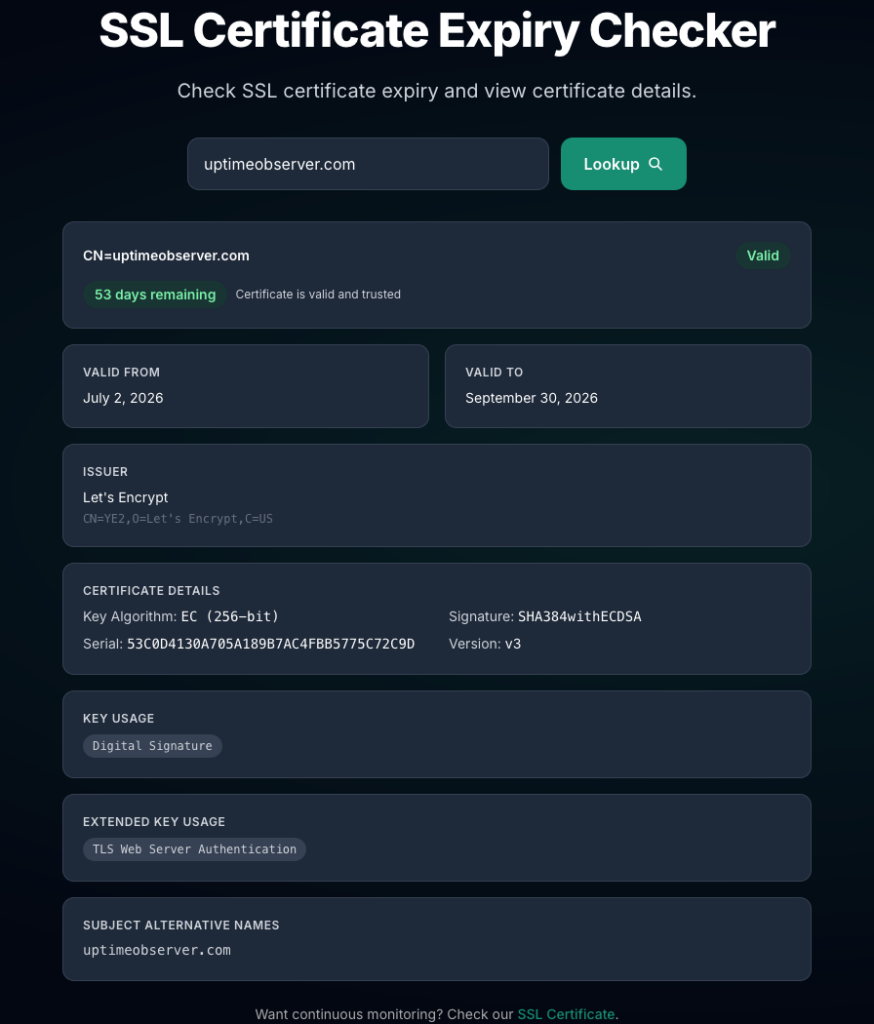
Browsers are fine for a quick glance, but they don’t show the full chain or potential configuration errors. For a more technical breakdown without dropping into a terminal, I prefer using the Free SSL Certificate Expiry Checker. Just drop in your URL, and it tells you exactly how many days you have left and if your intermediate certificates are healthy.
Method 2: The Developer’s Way (OpenSSL)
If you’re working in a terminal and want to check a remote server’s certificate expiration without opening a browser, OpenSSL is your best friend.
Run the following command in your terminal:
openssl s_client -connect yourdomain.com:443 -servername yourdomain.com 2>/dev/null | openssl x509 -noout -dates
Warning: The Single-Node Blindspot
Whileopenssl s_clientis great for a quick check, it only queries the single IP address or load balancer node that your local DNS happens to hit. If you run a cluster of application servers behind a round-robin DNS or a Content Delivery Network (CDN), one node might be serving a freshly renewed certificate while another is serving a stale one. A single terminal command can easily give you a false sense of security.
This will output the notBefore and notAfter dates. It’s powerful, but it’s still a manual snapshot. It won’t tell you if the certificate expires while you’re asleep.
Method 3: Automated SSL Monitoring (The Professional Standard)
Since I can no longer rely on a spreadsheet, SSL monitoring has become a non-negotiable part of my broader uptime strategy.
What to Look for in a Monitoring Tool:
- Multi-Stage Alerts: Notifications at 30 days, 14 days, and 7 days before expiry.
- Chain Verification: Many “SSL issues” aren’t about expiration at all; they are broken certificate chains. The monitor must verify the entire path.
- Revocation Checks: Verify whether the certificate has been revoked, in addition to checking its expiration date and chain..
- Integration: Alerts must go where the team actually lives, whether that’s Slack, Microsoft Teams, or Email.
Proactive Protection with UptimeObserver
At UptimeObserver, TLS Certificate Monitoring is built directly into the dashboard. Instead of me checking on the certificates, the certificates check in with me, tracking the handshake, cipher suite, and expiration date automatically.
Beware the “Deployment Gap”
A common mistake I used to make was assuming that because my ACME client (like Certbot) renewed a certificate, the site was safe. In modern infrastructure, renewal is only half the battle: distribution is the other half.
A famous example of this occurred during a major outage at Epic Games. When an internal wildcard certificate unexpectedly expired, it didn’t just cause a brief hiccup.
Even though the engineering team diagnosed the expiration in 12 minutes and successfully pushed a newly renewed certificate across their load balancers shortly after, the damage was already done. The brief window of expiration triggered a bug in millions of Epic Games Launchers, causing them to endlessly and aggressively retry their connections. This created a massive, self-inflicted DDoS attack that melted their backend services, overwhelmed their connection tracking tables, and broke their auto-scaling.
A single missed expiration date resulted in a brutal 5.5-hour total outage that required over 25 engineers to untangle.
This is why external monitoring from a third-party service like UptimeObserver is essential: preventing the expiration altogether is the only way to ensure you don’t trigger a secondary infrastructure meltdown.
Beyond Expiration: Monitoring Certificate Transparency (CT) Logs
Early in my career, I only cared about preventing downtime from expiration. Now, complete SSL monitoring also involves protecting against rogue certificate issuance. Publicly trusted certificates are subject to Certificate Transparency requirements, with certificates being logged in publicly auditable CT logs.
By monitoring CT logs for your domains, you can instantly detect if:
- A malicious actor managed to pass a Domain Control Validation (DCV) check for a subdomain.
- An employee or third-party vendor issued an unauthorized certificate using an unapproved CA.
Best Practices for SSL Management Moving Forward
To stay ahead of the shrinking validity windows, I follow these three rules:
- Automate Renewals, then Monitor: Use tools like Certbot for automation, but never assume they worked. Always have a third-party monitor (like UptimeObserver) verifying the external result.
- Renew Early: Don’t wait until the last 48 hours. Give yourself a two-week buffer to handle any DNS or validation hiccups.
- Audit Your Subdomains: Forgotten subdomains (like
dev.example.com) are the most common sources of SSL-related downtime.
Final Thoughts
The window for error is shrinking rapidly. As certificate lifespans drop toward the 47-day mark, the risk of a “human error” expiration increases exponentially. My old manual habits simply don’t scale anymore.
Don’t leave your site’s reputation to a spreadsheet. Start Monitoring Your SSL Certificates with UptimeObserver.